Free desktop app

Inspect FIX and
market data.

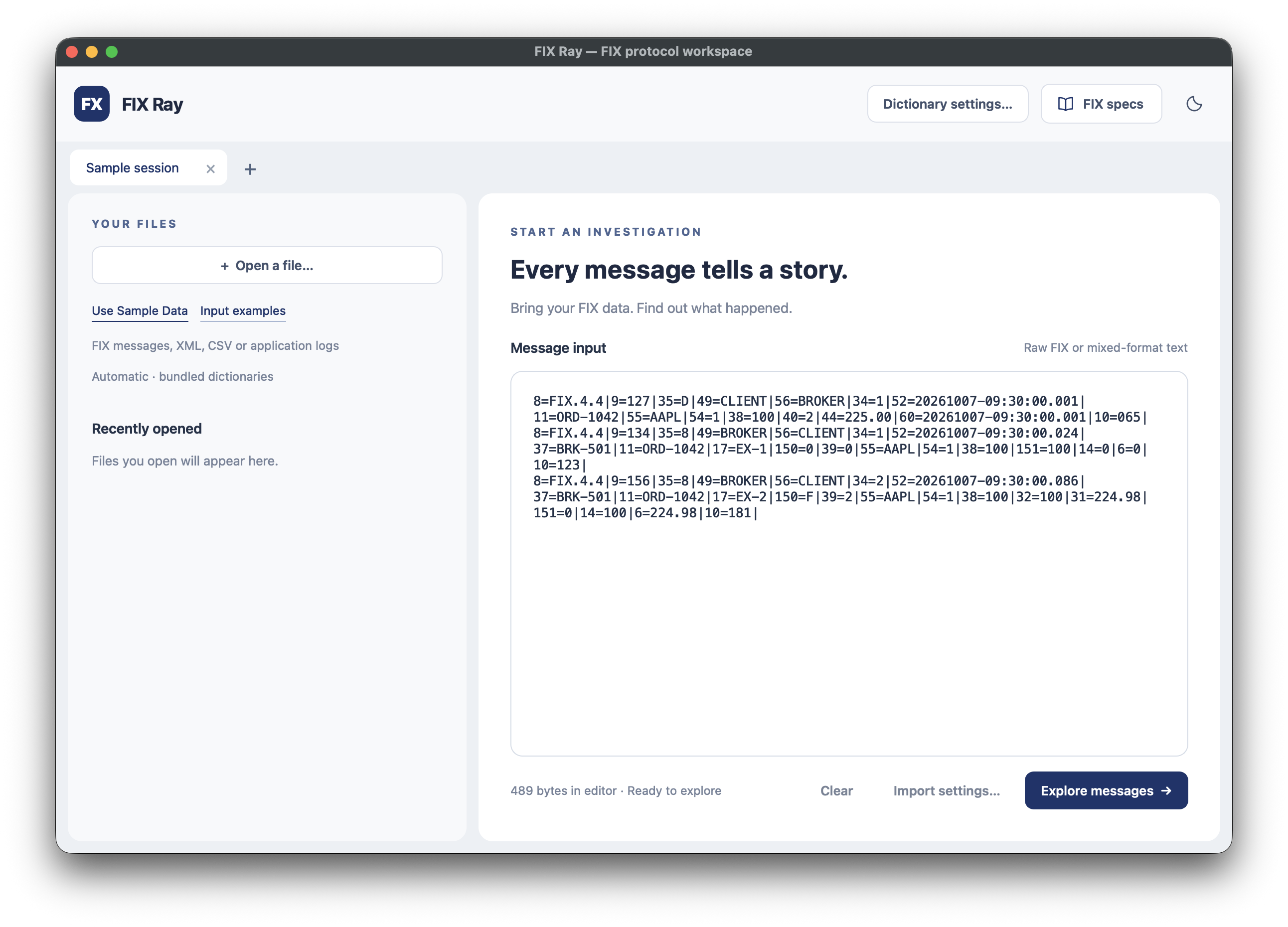
Extract FIX messages from logs or pasted text. Search, filter and sort messages, preview their contents, read field explanations, and query the data with SQL.

macOS and Linux. Bundled FIX dictionaries. Light and dark themes.

ORD-1042 / AAPLSample
An order, in contextFIX 4.4
  1. New orderBuy 100 AAPL · Limit 225.00
  2. AcknowledgedBroker order BRK-501
  3. Filled100 shares · Price 224.98
Inside the fillTag → Meaning
Selected fields from the sample execution report
TagFieldValue
35MsgType8 Execution Report
150ExecTypeF Trade
32LastQty100
31LastPx224.98
Illustrative view of the bundled sample messages.
Supported input
  • FIX / text logs
  • CSV
  • JSON
  • NDJSON
  • Pasted text

Workflow

Import, search
and inspect messages.

Open a log file or paste text containing FIX messages. The app extracts the messages and shows them in a searchable list with a preview of each selected message.

  1. 01 / Import

    Extract FIX from logs

    Import FIX or text logs, CSV, JSON or NDJSON. Preview the input and select the CSV column or JSON property containing FIX messages.

    Choose actual SOH bytes, pipes (|), or escaped delimiters.

  2. 02 / Explore

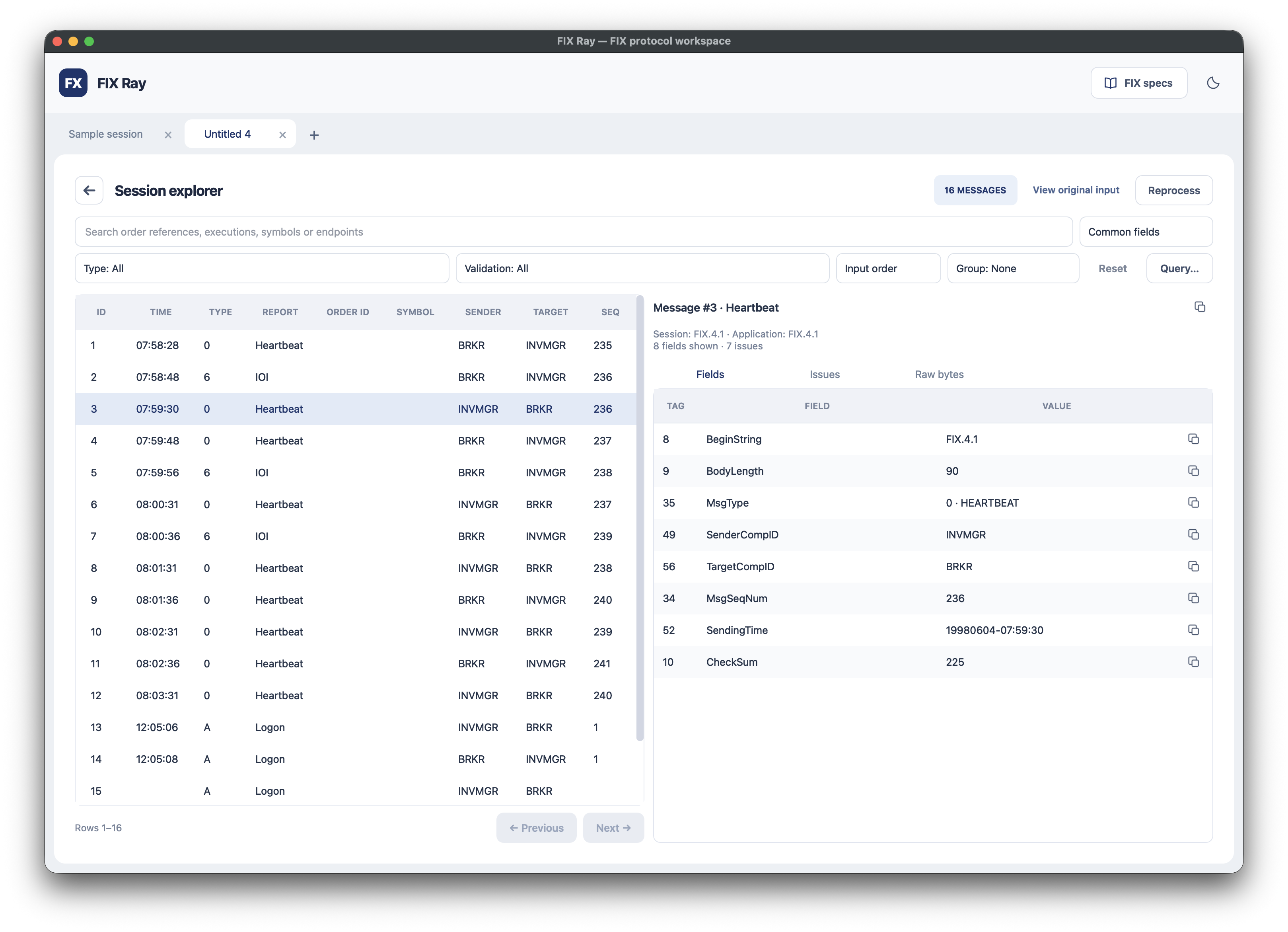
    Search, filter and sort

    Search by order references, execution ID, symbol, sender, target, sequence number or message ID. Combine search with message type and validation filters.

    Sort by input order, message ID, sequence or message type. Group by order, symbol, message type, endpoints or status, then open a group to view its messages.

  3. 03 / Inspect

    Preview messages and fields

    Select a message to preview its fields, validation issues and raw bytes. View field names, value meanings and repeating groups.

    Click a tag, field name or value for its data type and dictionary explanation. Copy an individual field or the entire message.

Features

FIX versions, market data
and field explanations.

Inspect trading, session and market data messages using the bundled dictionaries or your own definitions.

Supported FIX versions

  • FIX 4.0
  • FIX 4.1
  • FIX 4.2
  • FIX 4.3
  • FIX 4.4
  • FIX 5.0
  • FIX 5.0 SP1
  • FIX 5.0 SP2 (EP97)
  • FIX Latest (EP312)
  • FIXT 1.1 (session messages)

Dictionaries are bundled for offline use. You can also load a custom XML dictionary or a venue profile.
Market data messages

Inspect FIX market data snapshots (35=W) and incremental updates (35=X), including repeating groups with entry types, prices, sizes, entry IDs and update actions.

Search by symbol, filter by message type, and use SQL to inspect entries inside repeating groups.

Field explanations and validation

See each field’s name, data type, enum meaning and dictionary documentation. Review validation issues with their severity and field or byte location.

Original source bytes, field order, unknown tags and duplicate fields are retained for inspection.

Change dictionaries and reprocess

Change the FIX version or dictionary settings and reprocess the imported messages. Cancelled or failed changes keep the last completed analysis available.

Full FIX message workflow

Inspect the full message flow: Logon and Heartbeat, new orders, acknowledgments, partial and full fills, cancel/replace requests, rejections and Logout.

Group messages by client order ID to follow an order from New Order Single through its execution reports.

Custom tags and groups

Load a custom FIX XML dictionary or venue profile defining your tags and repeating groups, including nested groups. Inspect their field names, data types and enum meanings.

Unknown tags are also retained for inspection and SQL queries. Interpreting custom group structure requires matching dictionary definitions.

Analytics / SQL queries

Analyze and query
FIX data with SQL.

Analyze imported FIX data in the built-in DuckDB editor. Create summaries, compare activity by sender or symbol, and join messages with fields, repeating groups and validation issues using SQL.

  • Aggregate message counts by type, sender or symbol.
  • Analyze order and execution activity across messages.
  • Examine market data prices and sizes inside repeating groups.
  • Join message and field tables, filter results, group values and sort your analysis with SQL.

The Query panel runs read-only SELECT queries on the same data shown in the explorer, with copyable examples and a results preview. Queries run in the background and can be cancelled.

SQL example

Count messages by type

Group the imported FIX messages by message type and show the most frequent types first.

SELECT msg_type, msg_type_name,
       COUNT(*) AS message_count
FROM messages
GROUP BY msg_type, msg_type_name
ORDER BY message_count DESC;

Download / Version 1.0.0

Download FIX Ray.

The app is free. Choose the package for your desktop. Each package includes the app, its libraries and FIX dictionaries.

Apple Silicon / arm64

FIX Ray for macOS

Requires macOS 27.0.1 or newer.

Download for macOS

ZIP · 39 MB · SHA-256 checksum

Open on your Mac

Unzip the download, move FIX Ray.app to Applications, and open it.

This build has no Apple Developer ID signature or notarization. If macOS blocks it, open System Settings → Privacy & Security → Open Anyway after attempting to launch it. See Apple’s instructions.

Linux / x86_64

FIX Ray for Linux

Ubuntu 24.04+ or a desktop with glibc 2.39+.

Download for Linux

tar.gz · 62 MB · SHA-256 checksum

Extract and run

Extract the archive and launch fix-ray inside the extracted folder. Keep the folder together. No administrator install is needed.

tar -xzf fix-ray-1.0.0-linux-x86_64.tar.gz
cd fix-ray-1.0.0-linux-x86_64
./fix-ray

Works with X11 or Wayland. Your desktop supplies fonts and graphics drivers.

Installation details and checksum instructions are in the downloads repository .